top of page
TANG JU YI
Architecture Degree Portfolio
Project 3
A MAXIMUM 90 SECONDS ANIMATION OF THE COMPLETED 3D SCENE
The learning objectives are:
-
To continue from Project 2
-
To set up camera pths for animation rendering
-
To allow students to explore their imagination, inventiveness and storytelling abilities when creating the animation
 |  |  |
|---|---|---|
 |  |  |
 |  |  |
Include more furniture and create better landscape for the exterior of the house.
 |  |  |
|---|---|---|
 |  |  |
 |  | 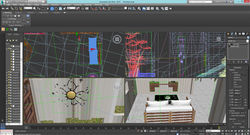 |
Draw a path using NURBS CURVES for the camera walkthrough.Click "walkthrough assistant" and create a free camera. Pick the path created and adjust the path to desired height and level. Turn on Autokey to record the movement of the house.Set 20 frames per second from the time configuration. I have created different scenes including the living room, bedroom, study room, dining room, kitchen and exterior.
THE VIDEO -WHO?
bottom of page